Power Mode User Guide
Note
SL2610 Power Modes are implemented in the M52 firmware and are currently released as a binary. This guide applies to SL1620, SL1640, and SL1680.
Overview
Astra Machina supports two types of power modes, as follows.
Suspend Mode
System state is stored in RAM
Most hardware is powered off except RAM and the AON domain
Can resume very fast
Low Power Mode
System is fully turned off
Only AON domain is alive
Suspend Mode |
Low Power Mode |
|
|---|---|---|
SL1620 |
✔ |
✖ |
SL1640 |
✔ |
✔ |
SL1680 |
✔ |
✔ |
SL261x |
✔ |
✔ |
Power Flow
The commands below are used to enter power flow.
Suspend
“systemctl suspend” or “echo mem > /sys/power/state”
Low Power
“shutdown -h now”
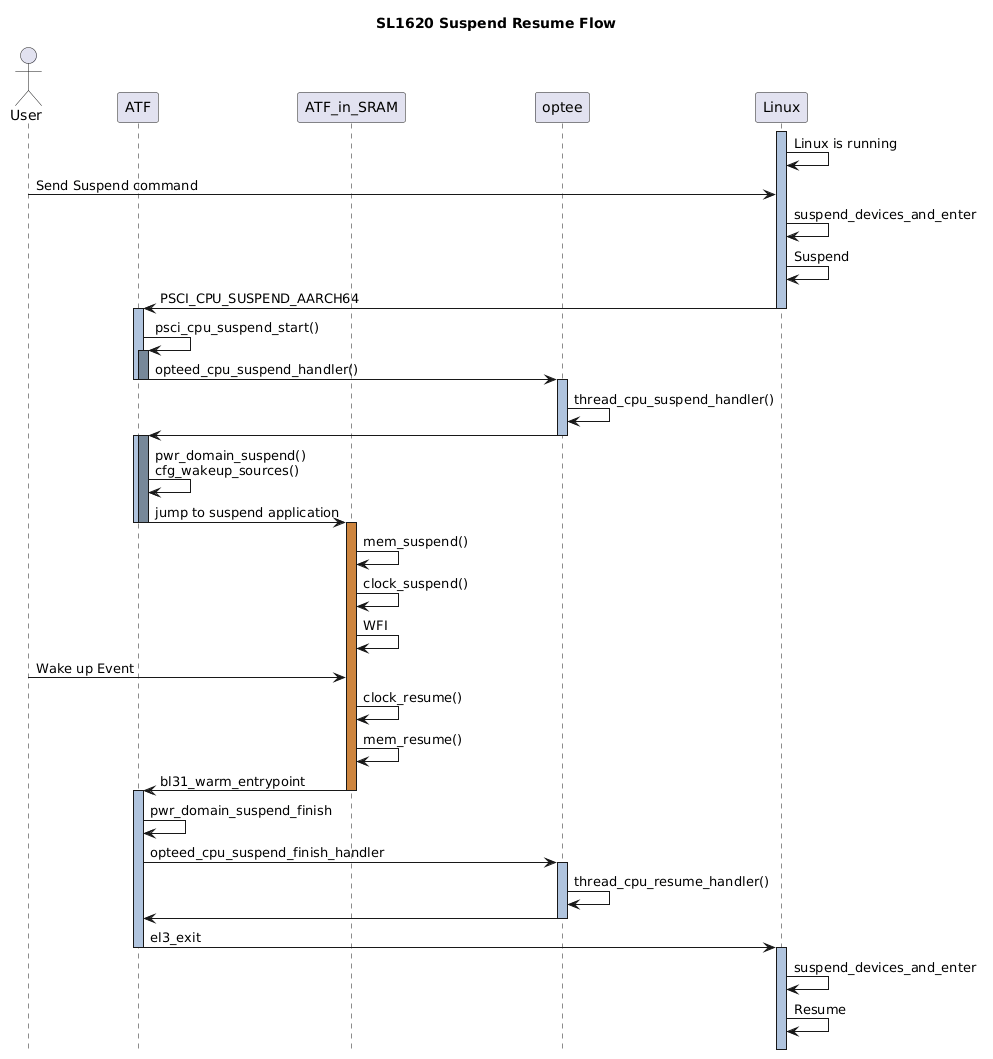
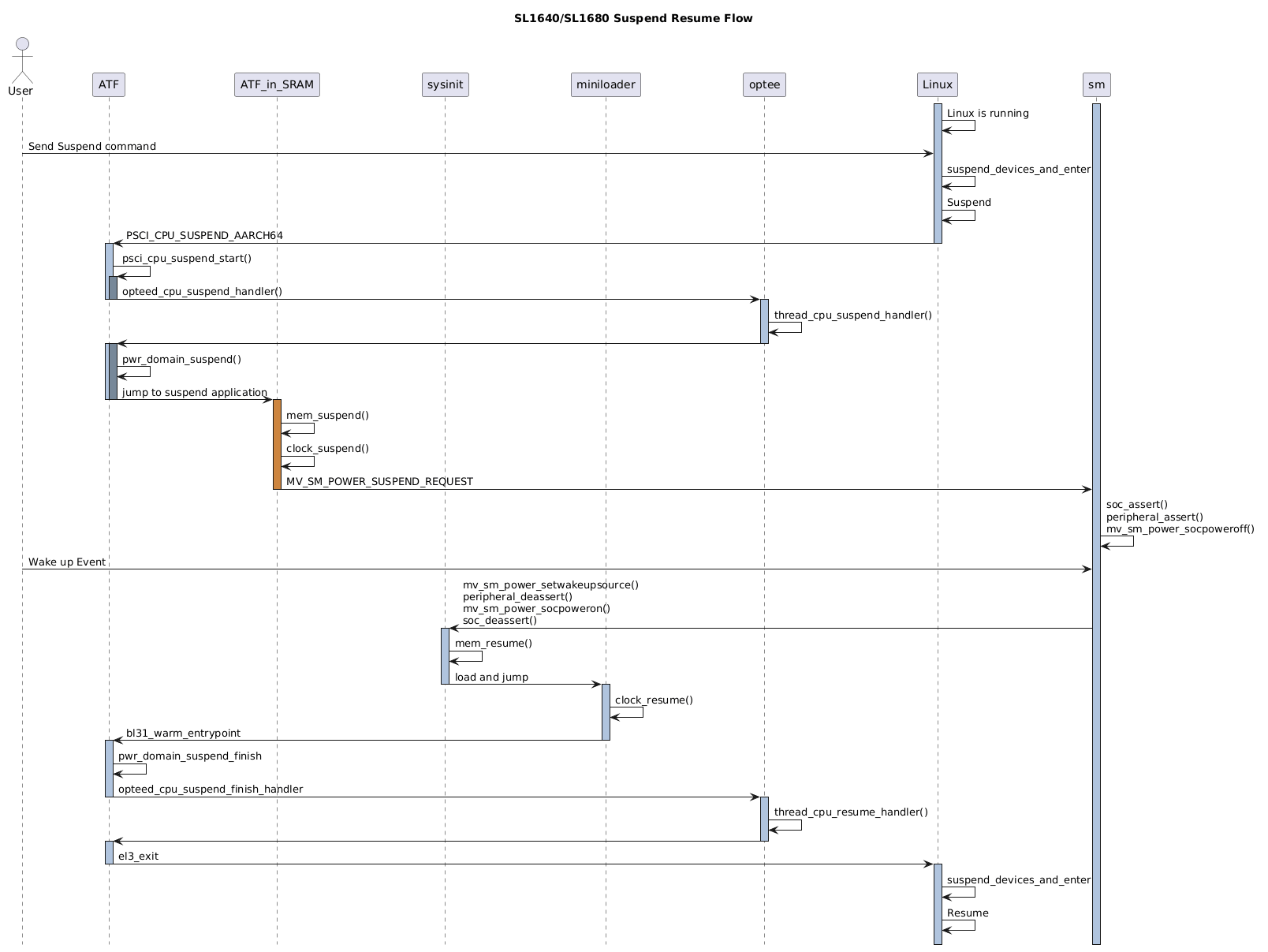
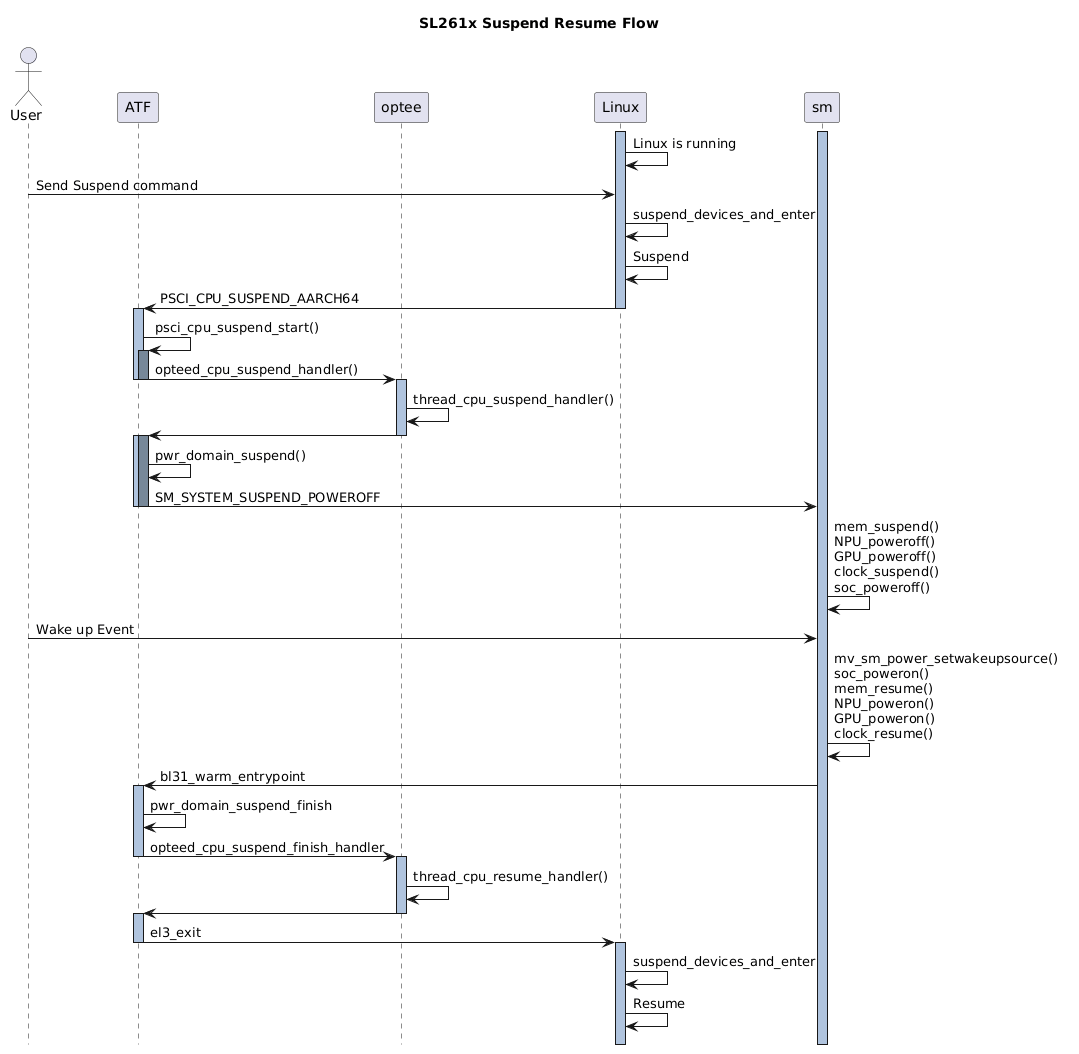
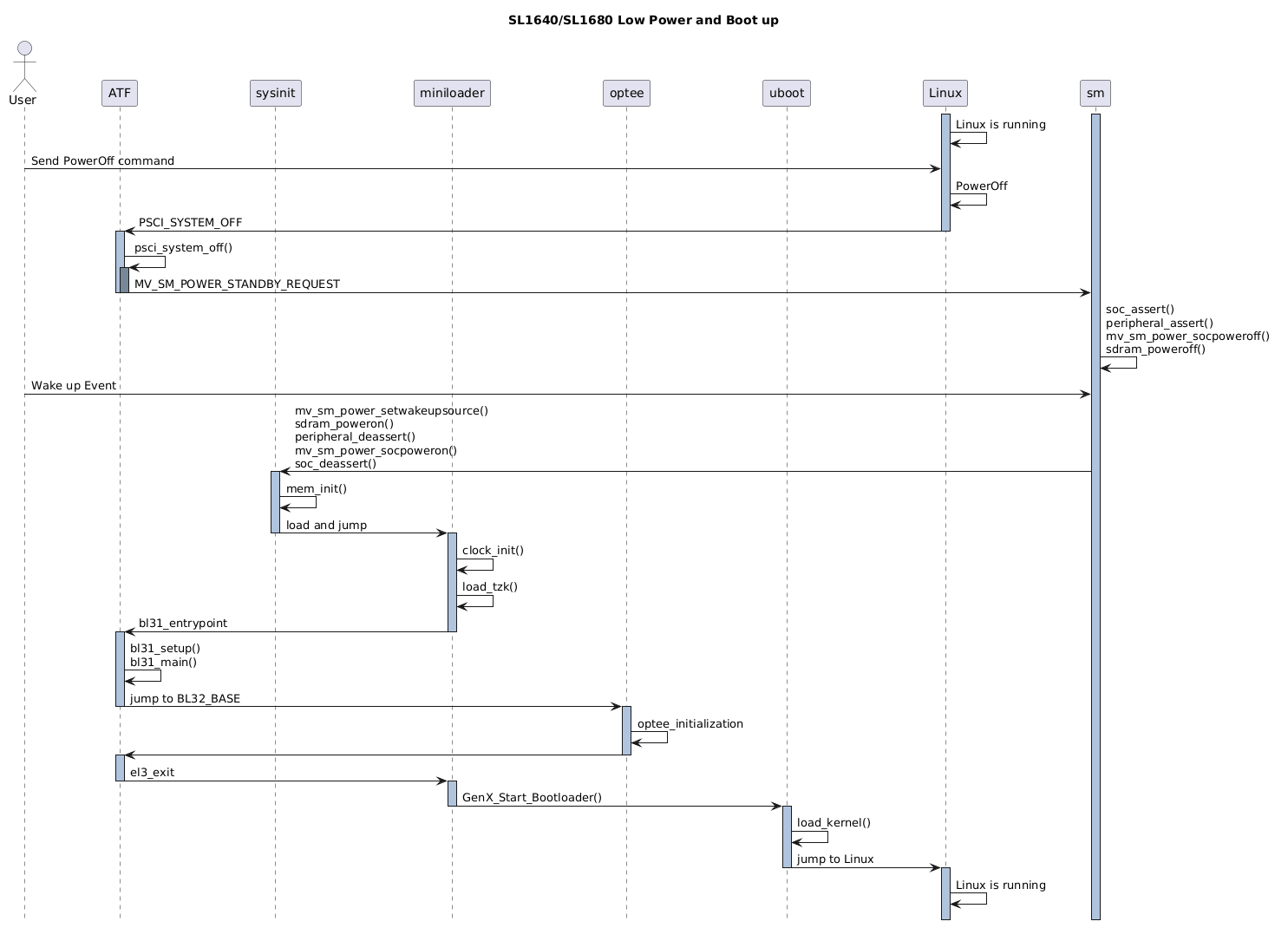
The following diagrams show the power flow of Astra platforms.
Suspend and Resume
alt text
Note
Under Suspend mode of SL1620, VCPU domain remains alive and primary CPU is in WFI state while other CPUs are powered off.
alt text
Note
The System Manager of SL1640/SL1680 is limited to access the resources of SoC power domain.
alt text
Note
The System Manager on SL261x has full access permission to SoC side.
Low Power and Boot-Up
SL1620 does not support Low Power mode because it does not include System Manager on SL1620.
alt text
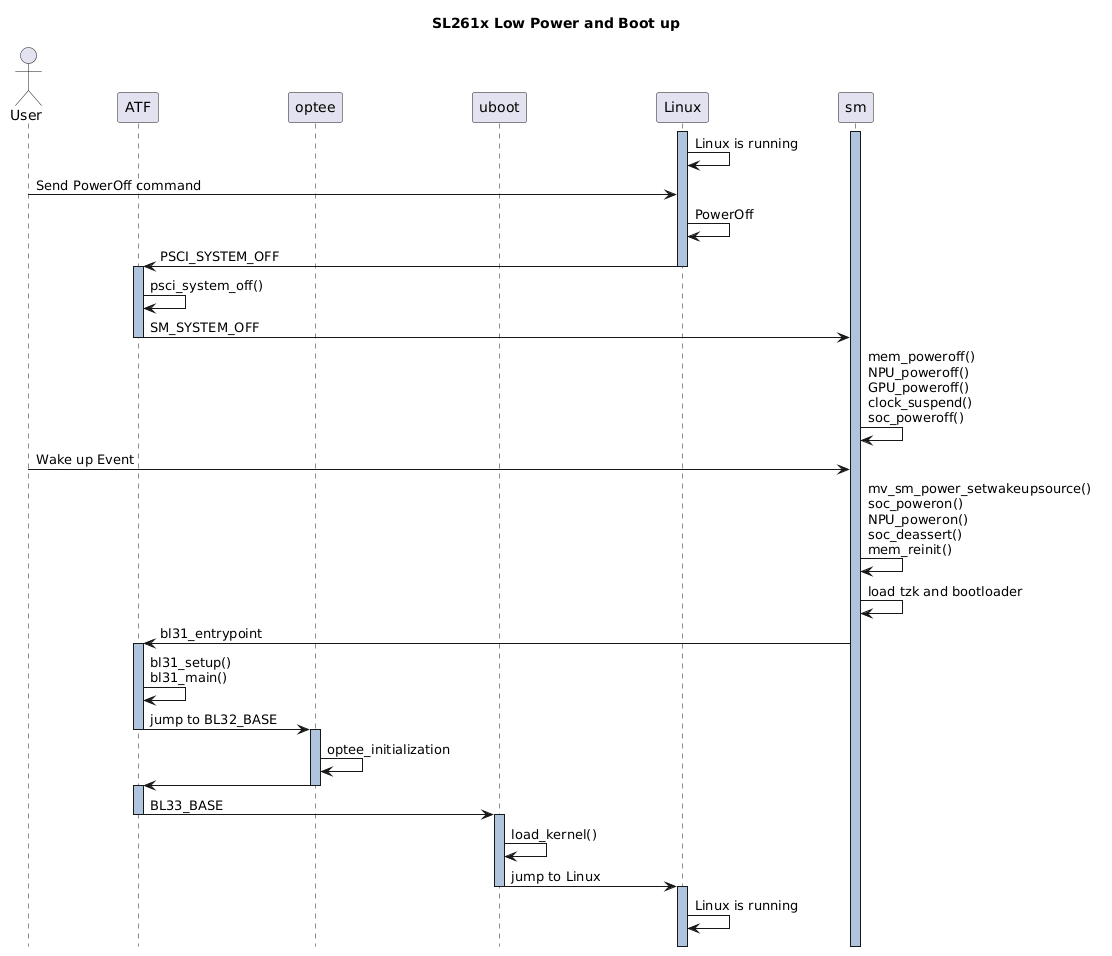
alt text
The boot-up from Low Power mode is almost the same as cold boot.
Configurations and Settings
To support power mode, each module needs to set the appropriate configurations.
Linux Kernel Configurations
Linux Kernel 6.12 as an example, below options are needed to enable the power mode.
Core Power Management (MANDATORY)
CONFIG_PM=y
CONFIG_PM_SLEEP=y
CONFIG_SUSPEND=y
CONFIG_SUSPEND_FREEZER=y
ARM64 Architecture Support
CONFIG_ARM64=y
CONFIG_ARCH_SUSPEND_POSSIBLE=y
CONFIG_ARCH_SUSPEND_NONZERO_CPU=y
PSCI
CONFIG_ARM_PSCI_FW=y
CONFIG_ARM_PSCI_CPUIDLE=y
CONFIG_ARM_PSCI_CPUIDLE_DOMAIN=y
CPU Idle Framework
CONFIG_CPU_IDLE=y
CONFIG_CPU_IDLE_MULTIPLE_DRIVERS=y
CONFIG_DT_IDLE_STATES=y
Device Tree Support
CONFIG_OF=y
CONFIG_OF_SLEEP=y
Here is the power mode behavior on ARM64 defined in device tree.
psci {
    compatible = "arm,psci-1.0";
    method = "smc";
};

cpus {
    cpu@0 {
        enable-method = "psci";
    };
};

idle-states {
    entry-method = "psci";
};
ATF (Arm Trusted Firmware)
Both Suspend-to-RAM and Low Power require the cooperation of Arm Trusted Firmware.
- PSCI version >= 1.0 is recommended.The version of ATF in ASTRA release 2.3.0 is v2.7.0. It supports PSCI version 1.1.
Implement vendor specific PSCI operations.
To support power modes, ASTRA Machina implements below functions.
const plat_psci_ops_t berlin_plat_psci_ops = {
    .cpu_standby         = berlin_cpu_standby,
    .pwr_domain_on           = berlin_pwr_domain_on,
    .pwr_domain_off          = berlin_pwr_domain_off,
    .pwr_domain_suspend      = berlin_pwr_domain_suspend,
    .pwr_domain_on_finish        = berlin_pwr_domain_on_finish,
    .pwr_domain_suspend_finish   = berlin_pwr_domain_suspend_finish,
    .pwr_domain_pwr_down_wfi = berlin_pwr_domain_pwr_down_wfi,
    .system_off          = berlin_system_off,
    .system_reset            = berlin_system_reset,
    .system_reset2           = berlin_system_reset2,
    .validate_power_state        = berlin_validate_power_state,
    .validate_ns_entrypoint      = berlin_validate_ns_entrypoint,
    .get_sys_suspend_power_state = berlin_get_sys_suspend_power_state,
};
System Manager
The System Manager resides in the AON domain and it is responsible for the power management of SoC. It uses GPIO or PMIC to control the on/off of power.
Table of Power Control
Power Domain |
SL1640 |
SL1680 |
SL261x |
|---|---|---|---|
VCORE |
EXPANDE R.SM-TW3.GPIO0_0 |
EXPANDE R.SM-TW3.GPIO0_0 |
S Y8827N.SM_TW2.0x60 |
VCPU |
EXPANDE R.SM-TW3.GPIO0_0 |
EXPANDE R.SM-TW3.GPIO0_1 |
✖ |
VDDM |
EXPANDE R.SM-TW3.GPIO0_2 |
EXPANDE R.SM-TW3.GPIO0_2 |
EXP.SM-TW0.GPIO0_2 |
V DDM_LPQ |
EXPANDE R.SM-TW3.GPIO0_3 |
EXPANDE R.SM-TW3.GPIO0_3 |
EXP.SM-TW0.GPIO0_3 |
Stan d-By_En |
EXPANDE R.SM-TW3.GPIO0_4 |
EXPANDE R.SM-TW3.GPIO0_4 |
EXP.SM-TW0.GPIO0_4 |
NPU |
Not Control by SM |
Not Control by SM |
Reg.R A_Gbl_npu_pwr_ctrl |
GPU |
Not Control by SM |
Not Control by SM |
Reg.RA_ Gbl_gfx3D_pwr_ctrl |
Power Measurement
This section focuses on power measurement in Suspend and Low Power modes.
To quick check if the power domain is powered off or on, Astra Machina platforms provides short and voltage check points. Please refer to the part of “Short and voltage check points” in Astra Machina Eval Platform.
Here shows the diagram of SL261x.
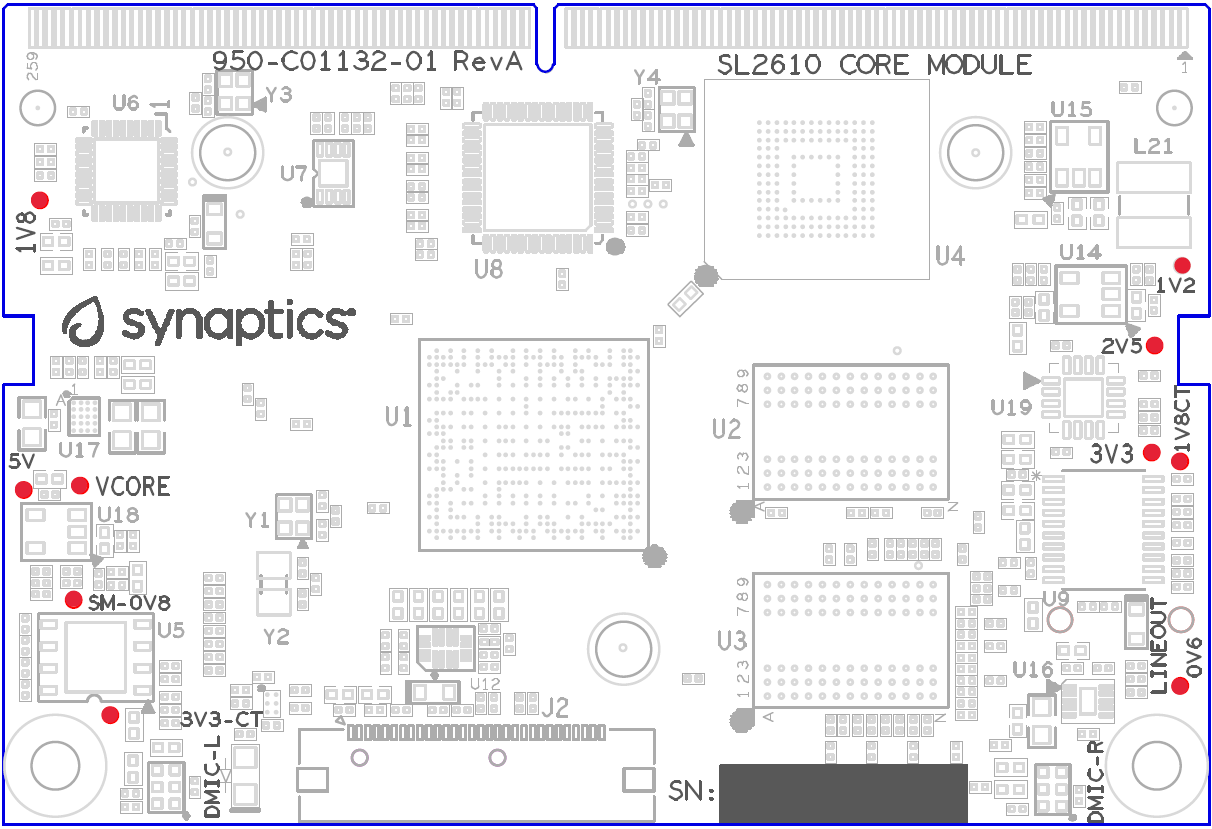
alt text
To get the accurate power data, please use Power Meter.
For SL261x, software provides a way to calculate the power under Suspend and Low Power. Here are the steps.
“systemctl suspend” or “echo mem > /sys/power/state” to suspend
Wait for about 10 second
Press ‘p’
Example output:
0356393760:[0][INF][SYS ]:System Power status (100 samples)0356396764:[0][INF][GENR]: PWR_3V3 PWR_1V8 VCORE_SOC VDDM_1V2 VDDM_2V5 VCORE_SM Total Power0356396764:[0][INF][GENR]: 134.27 31.85 0.00 24.16 10.02 19.65 219.95(mW)
By the way, Kernel also implement a feature to measure power at runtime. Power Measurements with Astra Machina
Wake-Up
Wake Up Source
ASTRA Machina supports several wake up sources relies on the design of the board. Here lists several possible sources.
UART
UART wake up is enabled by default and the wake up keys are ‘W’, ‘w’ and space.
CEC
CEC wake up is supported in Android case. Here lists the wake events.
CEC_MSG_OPCODE_IMAGE_VIEW_ON
CEC_MSG_OPCODE_TEXT_VIEW_ON
CEC_MSG_OPCODE_USER_CONTROL_PRESSED
CEC_MSG_OPCODE_ACTIVE_SOURCE
CEC_MSG_OPCODE_SET_STREAM_PATH
CEC_VEND_CMD_BUDDY_LAUNCH_SPECIFIC_APP
CEC_MSG_OPCODE_DECK_CONTROL
WOL
On SL1640, it use a built-in 10/100 FE-PHY. An interrupt will be triggered and send to Cortex CM3 NVIC controller. System Manager will receive and handle the event and boot SoC.
For Geth, if WOL package is received, it will toggle a SM GPIO. System Manager shall handle the GPIO signal and wake up SoC.
WIFI
The wake up signal of WIFI is also connected to a SM GPIO.
BT
BT uses the same way as WIFI. Toggling a GPIO to inform System Manager.
Note
Due to lack available GPIOs, Geth/WIFI/BT may share one or two GPIOs. To distinguish different wake up source, the different waveform is required. For BT, it also requires to distinguish Netflix key and other keys per Android’s demand.
Here is a possible implementation.
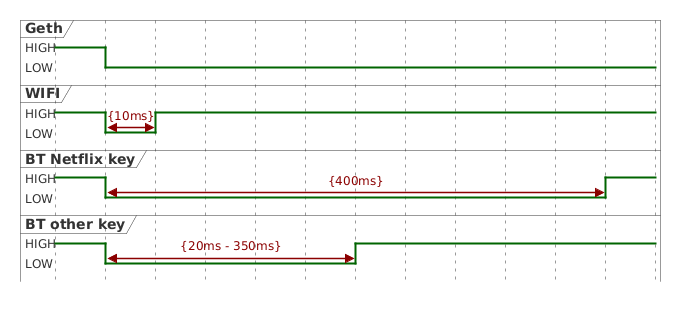
alt text
Wake Up Configuration
SL1620
CPU state is WFI on SL1620 Suspend Mode. Interrupt events are needed to wake up the system. It can be set by a SMCCC in u-boot or Linux.
Here is the example of u-boot.
#define SYNA_SIP_SMC32_WAKEUP_CONFIG 0x82000002
#define SYNA_SIP_SMC64_WAKEUP_CONFIG 0xC2000002
unsigned long call_syna_sip(unsigned long id, unsigned long reg0, unsigned long reg1, unsigned long reg2)
{
struct pt_regs regs;
regs.regs[0] = id;
regs.regs[1] = reg0;
regs.regs[2] = reg1;
regs.regs[3] = reg2;
smc_call(®s);
return regs.regs[0];
}
call_syna_sip(SYNA_SIP_SMC64_WAKEUP_CONFIG, CONFIG_SYS_WAKEUP_INTR1, 0, 0);
call_syna_sip(SYNA_SIP_SMC64_WAKEUP_CONFIG, CONFIG_SYS_WAKEUP_INTR2, 0, 0);
SL1640/SL1680
- WOL (only available on SL1640)Add “CFLAGS += -DWOLENABLE” in platform.mk.
- CECSet CONFIG_SM_CEC=y in the profile of a project.
- GPIOGeth, WIFI/BT wake up are all implemented through GPIO.Set GPIO mode in the Linux Kernel
dolphin-rdk.dtsin thelinux-synapackage.eth_phy_pmux: eth_phy-pmux { groups = "SM_TDI"; function = "gpio"; };
An example of SL1680.The configuration can be added to the
platform_customization.cin thesynasdk-smpackage. https://github.com/synaptics-astra/boot/blob/scarthgap_6.12_v2.4.0/bootloader/sm_cm3/syna/customization/dolphin/dolphin-rdk/platform_customization.cThis example is for dolphin (SL1680). Use platypus for SL1640.
DECLARE_GPIO_ISR(SM_GPIO_PORT_WIFIBT, EDGE_SENSITIVE, FALLING_EDGE, sm_gpio_isr);
#ifndef WIFIBT_GAP_MIN
#define WIFIBT_GAP_MIN  10
#define WIFIBT_GAP_MAX  125
#define ETH_GAP_MAX     512
#endif

#ifndef BTKEY_NETFLIX_GAP_MIN
#define BTKEY_NETFLIX_GAP_MIN 395
#define BTKEY_NETFLIX_GAP_MAX 415
#endif

/* wifi */
DECLARE_GPIO_WAKEUP(wifi, SM_GPIO_PORT_WIFIBT, 0, (WIFIBT_GAP_MIN *2), MV_SM_WAKEUP_SOURCE_WIFI, 0, 0);

/* bt (not netflix key) */
DECLARE_GPIO_WAKEUP(bt_otherkey, SM_GPIO_PORT_WIFIBT, (WIFIBT_GAP_MIN *2), BTKEY_NETFLIX_GAP_MIN, MV_SM_WAKEUP_SOURCE_BT, 1, KEY_OTHERS);

/* bt (netflix key) */
DECLARE_GPIO_WAKEUP(bt_netflixkey, SM_GPIO_PORT_WIFIBT, BTKEY_NETFLIX_GAP_MIN, BTKEY_NETFLIX_GAP_MAX, MV_SM_WAKEUP_SOURCE_BT, 1, KEY_NETFLIX);

/* geth */
DECLARE_GPIO_WAKEUP(geth, SM_GPIO_PORT_GEPHY, BTKEY_NETFLIX_GAP_MAX, DEFAULT_THOLD, MV_SM_WAKEUP_SOURCE_WOL, 0, 0);